

For the latest information on the Cortico plug-in, visit the Cortico plug-in website here.
The Cortico Plug-in automates tedious tasks in Oscar and other web based EMRs.
Securely message patients directly in the EMR
Send files securely
Automate eligibility checking and preferred pharmacy setting
Join video calls, view patient forms, etc.
Installation Instructions:
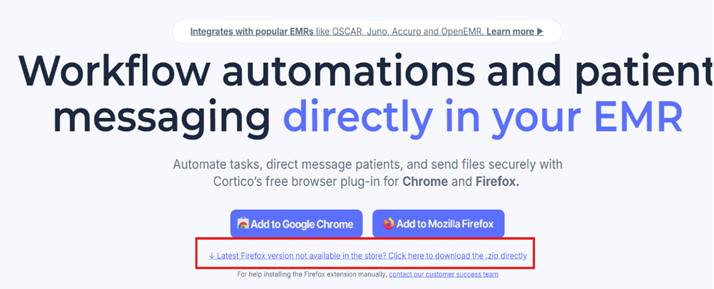
1. Go to https://plugin.cortico.health/ and download the .zip file by clicking on "... Click here to download the .zip file directly)
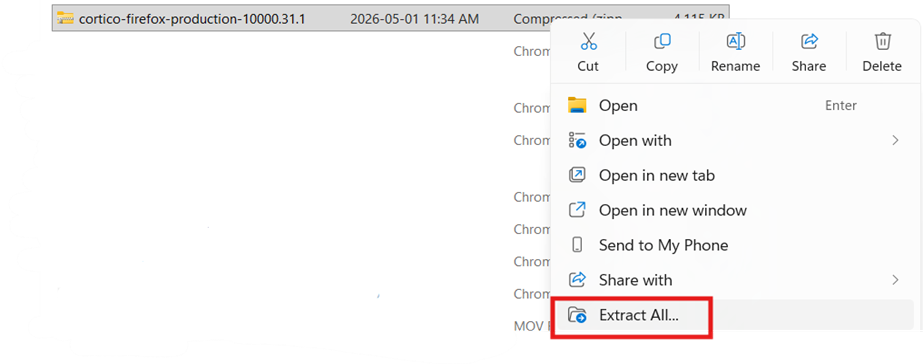
2. Unzip the download file on your local device
Find the downloaded file> Right click and select "Extract All"
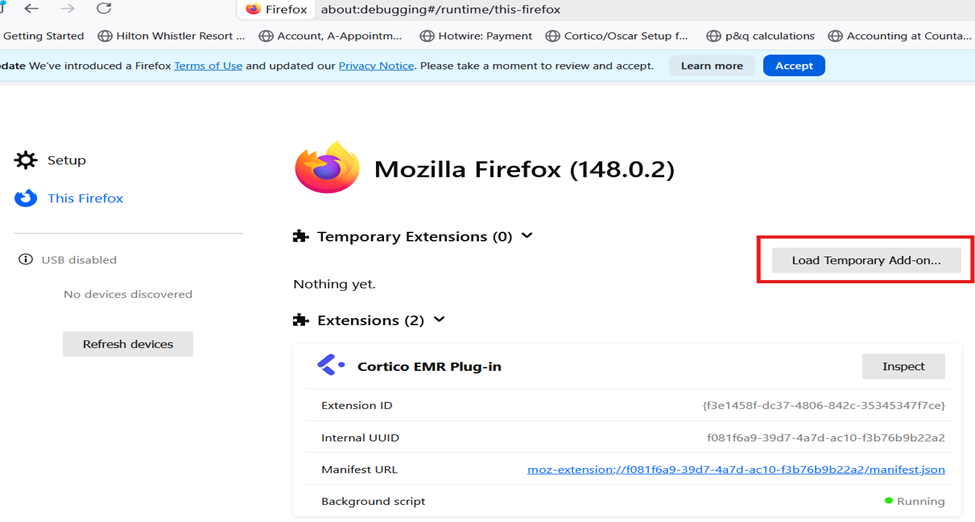
3. Go to "about:debugging#/runtime/this-firefox": load the unzipped file by selecting "Load temporary Add-on"> select the unzipped file
4. Go back to your EMR > Log into Cortico by clicking the Cortico logo at the bottom right corner>
Go to the patient's e-Chart page > Select a Document > Choose Settings > Test Connection
Once it gives you a Success! message, you should be all set!
Once you've installed the plug-in, check out this guide on how to complete the set-up.
What can you do with the Cortico Oscar Plug-In?
A video on how to use Canned Response from Cortico user John Robertson.