

Understanding the Service Events page
What this page is for
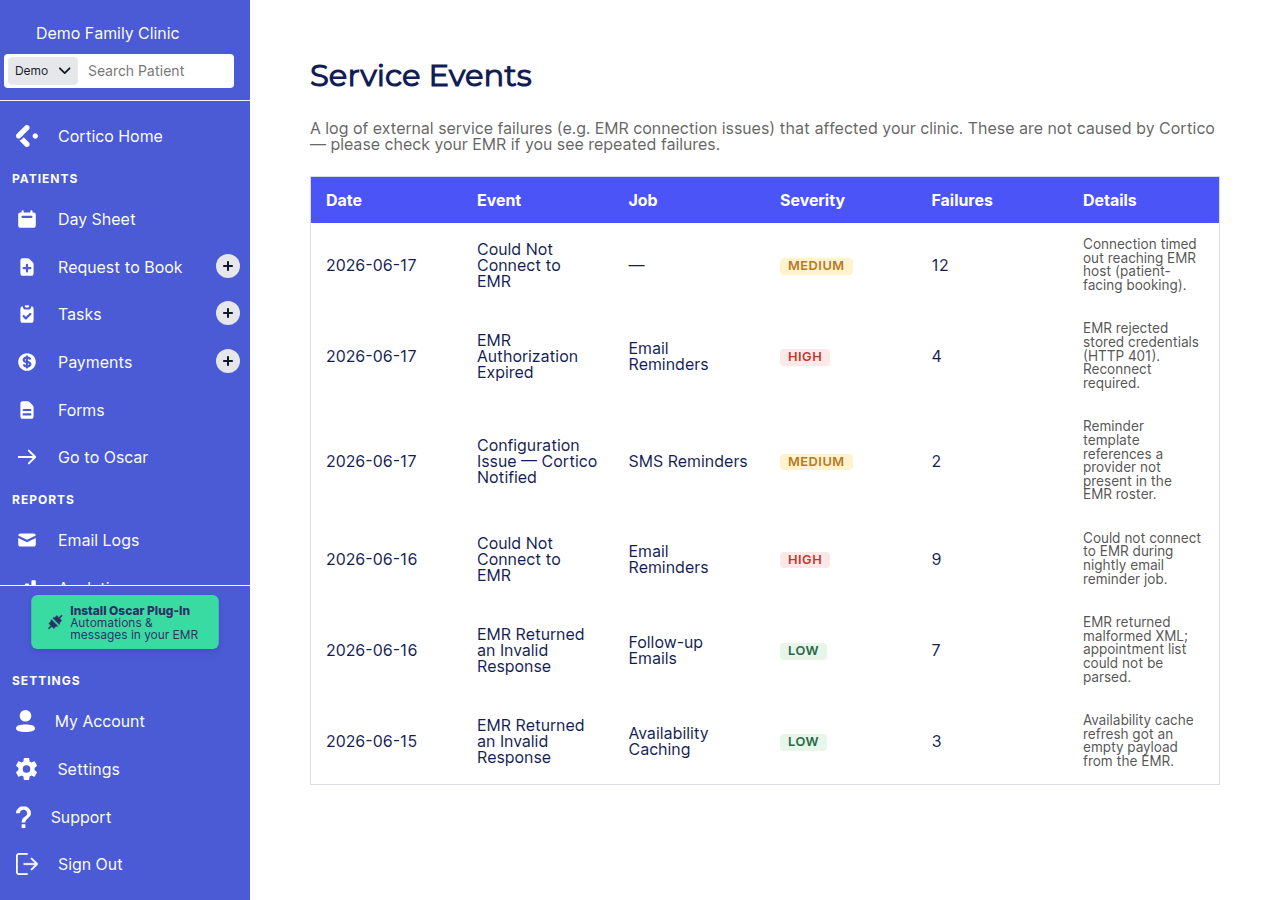
The Service Events page shows you when an outside system stopped Cortico from finishing an automated task for your clinic — for example, when your EMR was unreachable and your appointment reminders couldn’t be sent.
These are not Cortico outages. They’re a record of external problems, so you can answer “why isn't Cortico working” quickly, or before contacting support.
If the page says “No service events recorded,” everything has been running normally.
Reading the table
Each row is one type of problem on one day. Repeated failures on the same day are combined into a single row with a count, so the list stays short.
Column | What it tells you |
Date | The day the problem happened. |
Event | What went wrong. Today this is always “Could Not Connect to EMR” — Cortico couldn’t reach your EMR. |
Job | Which automated task was affected: Email Reminders, SMS Reminders, or Follow-up Emails. |
Failures | How many times it failed that day. A higher number means the problem lasted longer or recurred. |
Severity | How urgent it is: High, Medium, or Low. High-severity events mean a patient-facing task (like reminders) was blocked. |
Details | The most recent error message for that day — useful if you contact your EMR provider. |
What to do when you see an event
“Could Not Connect to EMR” means your EMR was down or unreachable when Cortico tried to run the job. To resolve it:
Check your EMR. Confirm it’s online and you can log in normally.
Check the status from EMR vendor. If the EMR was down that day (maintenance, an outage, a network issue), that explains the missed task — no action needed once it’s back up.
If the EMR looks fine but events keep appearing, contact Cortico support and share the date and the Details message from the row.
Cortico automatically retries these jobs, so a short EMR outage often resolves on its own once your EMR is reachable again.
Good to know
Reminders aren’t silently lost forever — events tell you exactly which task and day were affected so you can follow up with patients if needed.
One row per problem per day. The Failures count, not a long list of rows, shows how often it happened.
Details shows the latest error only. If a day had several different errors, the most recent one is kept.